
x
Outdoor security cameras can look sharp in daylight yet turn blurry or full of glare when the light or weather changes. This guide helps you compare bullet and PTZ options, understand WDR and local storage, and tackle common issues like focus, reflections and hot, dusty conditions.
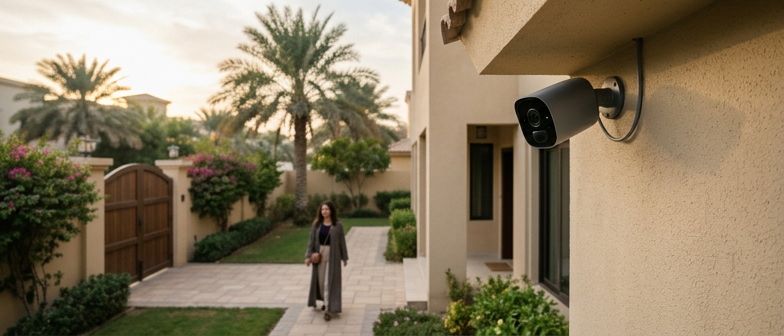
For a typical home, an outdoor security camera is used to see what happens around doors, driveways, and garden areas, and to keep recordings available for later review. Modern devices combine weather‑resistant housings, infrared night vision, and video storage on a memory card or a network recorder. Many systems also offer remote access through an app, but the basic role is to provide clear, usable footage of entrances, paths, and perimeter lines so residents can examine events or share material with relevant authorities when needed.
When choosing a camera for residential use, local standards for outdoor CCTV and general good practice guide what is considered appropriate. These guidelines focus on positioning cameras to cover your own property instead of neighbouring homes or public spaces, handling recorded video in a way that respects privacy, and selecting equipment rated for outdoor conditions. Wide dynamic range, often called WDR, is a common feature because it helps balance bright sunlight and deep shadows at exterior doors and gates, making faces and vehicle details more visible without relying on strong digital enhancement.
Outdoor image quality depends on resolution, sensor size, lens design, and how the camera handles strong contrasts in light. High resolutions only help if the lens is clean and properly focused and there is enough light. Wide Dynamic Range, often called WDR, is useful outdoors because entrances, pavements, and parked vehicles can sit in a mix of bright sunlight and deep shadow. Cameras with effective WDR use multiple exposures or processing so faces and license plates remain legible instead of turning into white glare or dark silhouettes. When comparing WDR security camera options, practical tests in scenes with backlit doors, low sun, and uneven shade give more insight than reading technical specifications alone.
Blur and glare are among the most common outdoor issues and often relate to installation or configuration rather than a faulty device. Blurry footage may come from incorrect focus, loose brackets that allow vibration, dirt or condensation on the front window, or slow shutter speeds that cannot freeze moving people and vehicles. Glare usually appears when direct sun, strong lamps, or reflections from glass and metal strike the lens, creating halos or washed-out areas. To improve clarity, it is typical to stabilise the mount, clean the glass, set focus at the key viewing distance, and adjust exposure. Glare is often reduced by slightly changing the viewing angle, adding a shade, and fine-tuning dynamic range and exposure for local lighting.
| Issue | Likely Cause | Helpful Setting or Feature | Installation Check | Recommended Adjustment |
|---|---|---|---|---|
| Daytime blur on people and vehicles | Slow shutter and incorrect focus | Shutter speed control, outdoor WDR mode | Verify focus at main walkway or driveway | Increase shutter priority and refocus lens |
| Soft image across entire scene | Dirty lens window or condensation | Weather‑sealed housing, cleaning alerts | Inspect front glass for dust and fog | Clean lens with microfiber and reseal covers |
| Glare around doors and reflective surfaces | Direct sun or strong lamp hitting lens | Wide Dynamic Range and highlight control | Check camera angle toward glass or metal | Slightly tilt view and enable WDR profile |
| Bright background, dark faces at entrance | Strong backlight and limited dynamic range | Backlight compensation, advanced WDR options | Assess contrast at doorway and porch | Activate backlight compensation and tune exposure |
| Image shaking and intermittent blur | Loose brackets or vibration | Electronic image stabilisation | Confirm mount is rigid and secure | Tighten fixings and reduce movement sources |
To improve a blurry outdoor security camera, first clean the lens and any dome with a soft microfiber cloth and suitable cleaner so dust, grease, or water marks do not soften the image. Check that covers and sunshields are correctly fitted and not cracked or fogged, and confirm the mounting bracket is secure so vibration does not shift the view. If the camera offers manual focus or zoom, adjust it while watching the live image, and in hot or dusty locations use an outdoor-rated enclosure and inspect seals so fine particles or moisture do not build up around the optics.
To reduce glare, change how light reaches the camera before altering image settings. Slightly tilt or rotate the housing so it avoids direct sun, headlights, and strong reflections from glass, metal, or pale walls, and add a small hood if the design supports it. At night, make sure infrared light is not reflecting off nearby surfaces or cobwebs; moving the camera or trimming branches can help. Then fine-tune exposure controls or wide dynamic range features gradually and check the picture at different times of day to find a balance between bright and dark areas.
The choice between a bullet camera and a PTZ camera starts with how you want to monitor outdoor areas. Bullet cameras have a fixed viewing angle and are aimed at specific zones such as a gate, driveway, or entrance. They are compact, simple to understand, and often installed in groups to cover several directions. PTZ cameras add motorized pan, tilt, and zoom, so the lens can follow activity or switch between distant points, which is useful for larger plots or shared spaces where events may occur in different parts of the scene.
Control and day‑to‑day use differ as well. A bullet camera is usually positioned once during installation and rarely changed, which suits households that prefer a straightforward, always‑on view. PTZ models depend on an app or control interface and on presets or patrol patterns, because the camera needs to be steered or programmed to cover the area. In many markets, individual bullet units are commonly the more affordable option for basic perimeter coverage, while PTZ equipment tends to involve higher hardware and installation costs due to moving parts and more advanced features.
When matching your budget and layout, think about coverage versus number of units. Several fixed bullet cameras placed at entrances and parking areas can provide continuous views that always watch the same scene. A single PTZ unit can reduce how many devices you install, but it typically focuses on one direction at a time, so details elsewhere may be missed if settings are not planned carefully. Households that want predictable, low‑interaction monitoring often choose bullet designs, while those ready to manage camera controls and needing flexible long‑distance viewing are more likely to consider PTZ systems despite their higher overall cost.
| Camera type | Coverage style | User interaction level | Installation & maintenance | Typical cost level |
|---|---|---|---|---|
| Bullet camera | Fixed view on specific zones | Low; set once and rarely adjusted | Simpler mounting; minimal upkeep | Lower; suited to basic perimeter coverage |
| PTZ camera | Adjustable pan, tilt and zoom | Higher; depends on app control and presets | More complex setup; moving parts to manage | Higher; reflects advanced features and hardware |
| Bullet camera | Continuous monitoring of one scene | Suited to predictable, always‑on viewing | Often installed in multiples for full coverage | Budget‑friendly for households adding several units |
| PTZ camera | Flexible monitoring across wider area | Requires active planning of patrol patterns | Can reduce number of devices installed | Best for layouts needing long‑distance flexible views |
| Bullet camera | Focused on entrances and driveways | Preferred by low‑interaction users | Straightforward for typical home installers | Aligned with modest home security budgets |
| PTZ camera | Covers larger plots or shared spaces | Preferred by users comfortable with controls | May need experienced installer support | Chosen when higher overall spend is acceptable |
When AE homeowners compare bullet and PTZ outdoor security cameras, features like local storage and wide dynamic range introduce practical trade-offs. Local storage on the camera, typically via a memory card or built-in drive, can keep footage available even if the network fails, but it may require careful control of physical access so that recordings cannot be removed or tampered with easily. In contrast, recording only to a remote system or cloud can simplify access management but depends more heavily on reliable connectivity and power.
Hot, dusty and humid conditions place extra stress on an outdoor security camera. For locations with strong sun and airborne dust, it is helpful to look at enclosure ratings that indicate resistance to particles and heat, and to consider housings with sunshields or ventilation to reduce thermal buildup. Mounting the camera out of direct afternoon sun, slightly elevated above typical dust turbulence and near existing shade can improve long term reliability. In homes, many people prefer compact, neutral coloured devices that do not dominate the façade but still cover entrances, driveways and garden boundaries.
Home CCTV also needs to reflect local privacy and compliance guidance. Domestic systems are often expected to focus on the owner’s property, limit views of neighbouring homes and public spaces where practical, and store recordings securely with defined retention periods. When using a nearby installer, residents can check whether they follow accepted standards for electrical safety, mounting and data protection, and whether they explain viewing angles, signage and recording policies. Even for do it yourself installation, referring to published home CCTV standards can reduce neighbour disputes and support responsible use of video footage.
How should I choose an outdoor security camera for a typical home?
Look for weather‑rated housing, resolution that makes faces recognizable, night vision, and a storage method you can manage, such as local card recording or a network video recorder.
How can I fix a blurry outdoor security camera image?
Clean the lens and cover, check for condensation or dust, tighten the mount, then refocus the lens if the model allows. Make sure the scene is well lit at night.
What is the practical difference between a bullet camera and a PTZ camera outdoors?
Bullet cameras give a fixed view and are simple for entrances or driveways. PTZ cameras add motorized pan, tilt and zoom, better for wide areas but cost more and need active control.
When is wide dynamic range (WDR) useful on an outdoor camera?
WDR helps when scenes mix bright sun and deep shadow. It keeps details at doors, windows and parked vehicles readable instead of washed out or too dark.
What should I ask a compliant outdoor CCTV installer near me?
Ask about their licensing, familiarity with home CCTV standards, data protection practices, how they secure local storage, and what maintenance and documentation they provide.