
x
When guests struggle to read your menu on mobile or find allergy details, the whole experience suffers before they arrive. This guide to restaurant website design helps you compare DIY builders with specialist designers, plan online booking and ordering, and prepare content that works on every device.
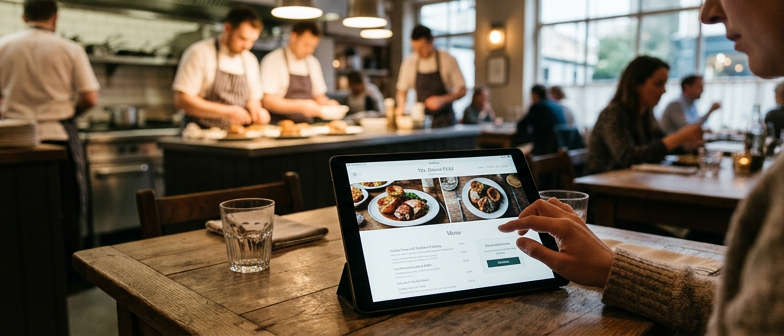
A modern restaurant website acts as a digital front door and should help people quickly decide whether to visit and how to book. Clear opening hours, location, contact details and an easy to skim menu are the basics of effective restaurant website design. Pages should load quickly, work smoothly on phones and tablets and convey the atmosphere through concise text and good images. Visitors look for the style of food, price range and how busy the restaurant typically is, and they expect to find this without downloading files or zooming. When key details are missing, hard to find or slow to load, people may leave and look for another place to eat.
Mobile use is now standard, so common frustrations need to be reduced. Menus uploaded as large PDFs or photographs are often difficult to read on smaller screens, so structured, responsive menu pages improve access. Many diners also prefer booking a table online rather than phoning, especially outside opening hours or when travelling. Simple, clearly labelled booking forms help reduce missed calls, avoid double bookings and make planning easier for the restaurant team. When information is readable on mobile devices and reservations can be made online, the website becomes a practical tool rather than a static brochure.
Many guests first find a restaurant on their phone, so menus must be readable on small screens. Fixed PDFs, photos of the printed menu or dense text that needs constant zooming are hard to use and often make people leave. A more accessible approach is to present dishes as responsive text with clear headings, concise descriptions and prices that resize for different devices. Larger fonts, good contrast, generous spacing and avoiding horizontal scrolling all help people compare options quickly while they are out and about.
Shifting from phone-only reservations to an online booking process can also support better restaurant website design. A simple form that gathers party size, preferred time, contact details and accessibility needs can reduce pressure on staff and gives diners a written confirmation. Some venues choose integrated reservation tools, while others use enquiry forms linked to email. In every case the booking option should be easy to find, work reliably on mobile, and explain response times, deposits and any limits on how long a table is held.
| Checklist item | Focus area | Priority in GB context |
|---|---|---|
| Use responsive text menus | Mobile readability | High |
| Avoid PDF or image-only menus | Mobile usability | High |
| Increase font size and contrast | Accessibility | High |
| Add clear spacing and no sideways scroll | On-the-go comparison | Medium |
| Place booking button prominently | Online reservations | High |
| Collect essentials only in booking form | Ease of use on phones | Medium |
People visit a restaurant website to see what is on the menu, what it costs and whether it fits their dietary needs. Clear, up to date menus with real text instead of images are easier to read on mobile and make it simpler to compare dishes and prices. Dietary details should cover common preferences such as vegetarian, vegan and gluten free choices and explain how they relate to recognised allergens under current national guidance. Labelling dishes with brief allergen notes and linking to fuller information helps diners with medical conditions or children to plan safely. It is useful to describe how the kitchen reduces cross contamination and whether dishes can be adapted, while avoiding any guarantee of complete safety.
Images also influence trust and expectations. Poorly lit, cluttered or distorted photos can make otherwise good food and service look careless. Thoughtful restaurant website design treats photography as part of the practical information by showing realistic dishes, portion sizes, table layout and features such as step free access or outdoor seating. Consistent colours and styles support brand recognition, but heavy filters or generic stock images may mislead visitors if they do not match the real experience. Simple improvements, such as using natural light, steady framing and accurate depictions of the menu, can make the site feel more professional and help diners rely on what they see when deciding whether to book or visit.
Clear dietary and allergy information can sit on a dedicated page or section that explains how the kitchen handles the 14 regulated allergens, and the same approach should appear on every menu. Short labels or icons for vegetarian, vegan and gluten-free dishes need a simple key that is easy to read on mobile, with ingredients written in plain language and major allergens clearly highlighted. Where dishes can be adapted, explain what can change and any limits caused by cross-contamination. A short disclaimer can note that recipes and suppliers may change and invite guests with severe allergies to confirm details with staff. To support accessibility, keep text size and contrast strong and make sure meaning does not rely only on colour or tiny symbols so screen readers can interpret it.
A key decision is whether a simple site built with a hosted website tool is enough or whether you need something more tailored. Generic templates usually include pages for menus, photos and bookings and can work if you only need basic information and are happy with limited control over layout and integrations. If you want a menu that is easy to read on mobile, structured dietary and allergy details, or more specific ordering and table booking journeys, you may need a designer or developer to configure the site so it reflects how your restaurant actually operates.
If you prefer not to build the site yourself, you can work with a freelancer, a larger studio or a practitioner who regularly designs restaurant sites. Independent designers are often more affordable and you deal directly with the person doing the work. Agencies bring a team covering design, development, content and imagery, which can help for a full rebrand or new concept. Specialists who focus on hospitality may understand typical needs such as online bookings, clear food information and simple updates, but you still need to review their previous projects, ask how changes will be handled and agree who will be your main contact.
Whatever route you choose, the process is broadly similar. You define goals, budget and core features, such as online reservations, ordering options and clear allergy labelling. You collect assets including an editable menu, brand colours, logo files and usable photos of dishes and the space. You then agree the page structure and schedule, review design drafts and test the site on different phones before launch. Being specific about priorities and how you will keep content accurate makes it easier to decide between a self‑service builder, a local designer or a more formal agency arrangement.
| Option | Flexibility for menus and allergy info | Support level | Setup complexity | Best suited for |
|---|---|---|---|---|
| Website builder | Low | Basic self‑service help | Low | Small sites with simple info |
| Freelancer | Medium | Direct contact with designer | Medium | Independent restaurants refining mobile menus |
| Agency | High | Structured team support | High | Multi‑site groups or full rebrand projects |
| Restaurant specialist | High | Focused on hospitality needs | Medium | Venues needing tailored bookings and food details |
Before you commission a restaurant website, define what it must achieve, such as a menu that is easy to read on mobile or simple online table bookings. Gather accurate details in one place, including opening hours, contact information, a short overview of the restaurant and key dishes to feature. Agree basic branding, like colours, logo files and fonts, and collect a few website examples that match your style, noting layout and navigation ideas to share with the designer.
If your current images look amateur, plan a focused photo session before design work begins. Aim for clear food shots, interior photos that show atmosphere, and staff images only where people are happy to appear. Keep lighting consistent, reduce background clutter and check how each photo appears on a phone screen. Provide the designer with all text, images and any access details for social media or booking and ordering tools so the site structure can be set up smoothly.
What makes an effective restaurant website today?
Show opening hours, address, phone and email clearly. Make the menu easy to read, ensure the site loads fast on mobiles, use good photos to show the atmosphere, and make booking or enquiries straightforward.
How can we make our menu easy to read on a phone?
Avoid PDFs and menu photos; use real text in a responsive layout. Choose larger fonts, strong contrast and clear headings so dishes and prices reflow without zooming or sideways scrolling.
How should dietary and allergy details appear online?
List ingredients in plain language, flag the main allergens and use simple icons or labels for vegetarian, vegan and gluten-free dishes. Add a short note about possible cross-contamination and advise guests with severe allergies to speak to staff.
Is a website builder enough for a small restaurant?
For a simple site with a basic menu and contact details, hosted builders are often sufficient. If you need structured allergy information, online ordering or integrated table bookings, a specialist freelancer or agency may configure these more effectively.
What should be ready before a web designer starts?
Prepare accurate opening hours, contact details, a short description, menus with dietary notes and your booking process. Also gather logo files, colour choices, preferred fonts and links to sites whose layout and style you like.